DO vs AWS: An AI Side Project's Cost Story
Aug 20, 2026$6. That’s what it costs to run EnggFeed’s entire stack for a month, on one DigitalOcean droplet. I gave a talk on how I got to that number, and what the same setup would cost on AWS. Here’s the writeup.
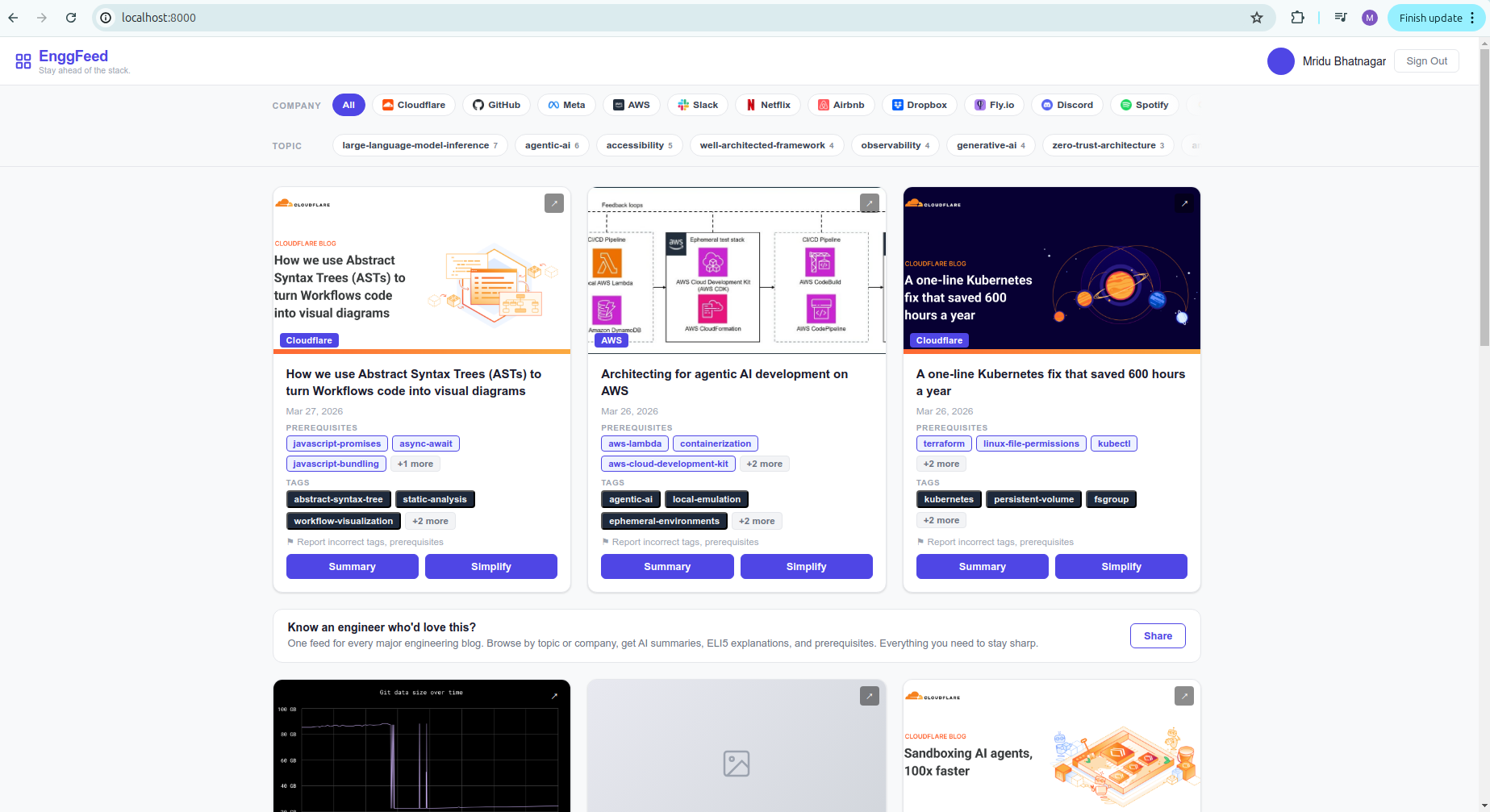 EnggFeed, running locally on real ingested data.
What EnggFeed Does
EnggFeed pulls engineering blog posts from companies like Cloudflare, AWS, Meta, and Netlify, and uses an LLM to attach a summary, tags, and prerequisites to each one, so you can tell at a glance whether a post is worth your time.
Two things happen behind the scenes:
On every page view: the FastAPI app checks Redis first, falls back to Postgres on a cache miss, and only calls Claude + OpenAI if the summary is stale.
Every night: a GitHub Actions cron job hits the /ingest endpoint, which calls Claude + OpenAI to generate tags, prerequisites, and embeddings for new posts, then writes everything to Postgres.
Every LLM call, in both flows, gets traced automatically by Phoenix.
What’s Actually Running
Six containers, split into two tiers.
Core, the app can’t run without these:
app: FastAPI backendpostgresql: blog + embeddings storeredis: cache
Support, nice to have, not required:
phoenix: LLM tracingpgadmin: Postgres admin GUIredisinsight: Redis admin GUI
On my laptop, idle, core uses about 247 MiB and support adds another 496 MiB, most of it Phoenix and RedisInsight. Under load, core climbs to 196 MiB (Postgres does most of the growing) and support to 609 MiB.

docker stats on the actual containers, close to the loaded numbers above.
On the server the picture looks different, because docker stats alone only shows RAM-resident memory. It understates anything that’s been swapped out. Phoenix, for example, showed 23 MiB resident, but was actually sitting at 345 MiB in swap, 368 MiB total.
Note: I don’t have a screenshot of the server-side numbers. That part was run live during the talk, not captured.
The 1GB RAM Problem
The droplet has 1GB RAM. Six services running together wasn’t quite enough, so I added swap to keep it from hanging.
- Before swap: 934Mi/961Mi used, 26Mi available
- After swap: 812Mi/961Mi used, 149Mi available (163Mi in swap)
To find out where the swap was actually going, I had to cross-reference two things DO doesn’t hand you together:
- RAM per container.
docker statsalready shows this. - Swap per process. Scan every process’s
VmSwapfrom/proc/<pid>/status:for pid in $(ps -eo pid=); do swap=$(awk '/VmSwap/{print $2}' /proc/$pid/status); [ "$swap" ] && echo "$swap $(ps -p $pid -o comm=)"; done | sort -rn - Map PIDs back to container names.
docker top, per container:for id in $(docker ps -q); do echo $(docker inspect --format '{{.Name}}' $id); docker top "$id" -o pid,comm; done - Add RAM + swap, per container. That gives a real, if slightly conservative, picture of what each service costs.
VmSwap only counts memory a process keeps to itself, so it misses shared memory like Postgres’s internal cache. The real number is probably a bit higher than what I measured.
What It Cost
The DigitalOcean droplet: $6/month flat. 1 vCPU, 1GB RAM, 25GB SSD, 1TB transfer bundled in. EnggFeed’s droplet, prorated for a partial June, came out to $3.28 pre-GST. No managed database, no managed cache, everything self-hosted in Docker. (My actual June DO bill was $7.74, but that includes a second, unrelated project’s droplet plus GST.)
DO vs AWS, Same Box
Here’s where the talk’s title comes from. I priced out what the same droplet would cost on AWS, two ways.
| DigitalOcean | AWS, minimal | AWS, right-sized | |
|---|---|---|---|
| Instance | Basic droplet | t2.micro | t3.small |
| CPU | 1 vCPU | 1 vCPU | 2 vCPU |
| RAM | 1GB | 1GB | 2GB, no swap needed |
| Storage | 25GB SSD | 25GB gp3 SSD | 25GB gp3 SSD |
| Transfer | 1TB bundled | 100GB free | 100GB free |
| Cost | $6.00/month | $9.05 + $2.28 = $11.33/month | $16.35 + $2.28 = $18.63/month |
Two things aren’t apples to apples here. gp3 is AWS’s general-purpose SSD, EBS’s default volume type. And outbound transfer isn’t equal either: DO bundles 1,000GB free per droplet, AWS gives only 100GB free per whole account, then charges $0.09/GB beyond that. Inbound is free on both. Going right-sized avoids the swap problem entirely, for roughly 1.6x the minimal AWS cost, still about 3x what DO charges flat.
Glossary
CPU: how fast the machine can think. More vCPUs means more work happens at once.
RAM: how much the machine can hold in its head right now. This is what runs out first on a small instance, and what forces you to add swap or upgrade.
Storage: how much the machine remembers after it sleeps. Disk space for the OS, the database, and everything else that needs to persist across restarts.
Transfer: how much data can leave the machine before you get charged extra. Only outbound traffic is metered, inbound is free. Bundled generously by DO, metered more tightly by AWS past the free allowance.